The Jurassic Park of Intune
Introduction
In my recent blog post I explored the the Intune service architecture, breaking down its core components and how they interact with each other to deliver modern endpoint management. Building on that foundation, this post dives deeper into the Windows client technologies, which keep the service communication "In tune" 😉.
Goals 🎯
My ambition with this write-up is to explain various processes behind the scenes, which are crucial for Intune and the Windows client to work properly. Many of my customers ask why certain aspects of Intune work the way they do - especially when they don’t fully align with their use cases. My goal is to bridge the knowledge gap between customers and Microsoft and write a summary of the most relevant technologies.
The Jurassic Park of Intune
Like in Jurassic Park, Intune has its own dinosaurs. By that, I mean we deal with evolving technology, each with its own specialties and use cases. Some are powerful and well-adapted, while others feel a bit outdated but still play a crucial role in the ecosystem. A lot of innovation is going on, however! Understanding these "species" is key to managing Intune effectively and avoiding unexpected surprises.
🦖 The MDM Stack – The T-Rex of Device Management
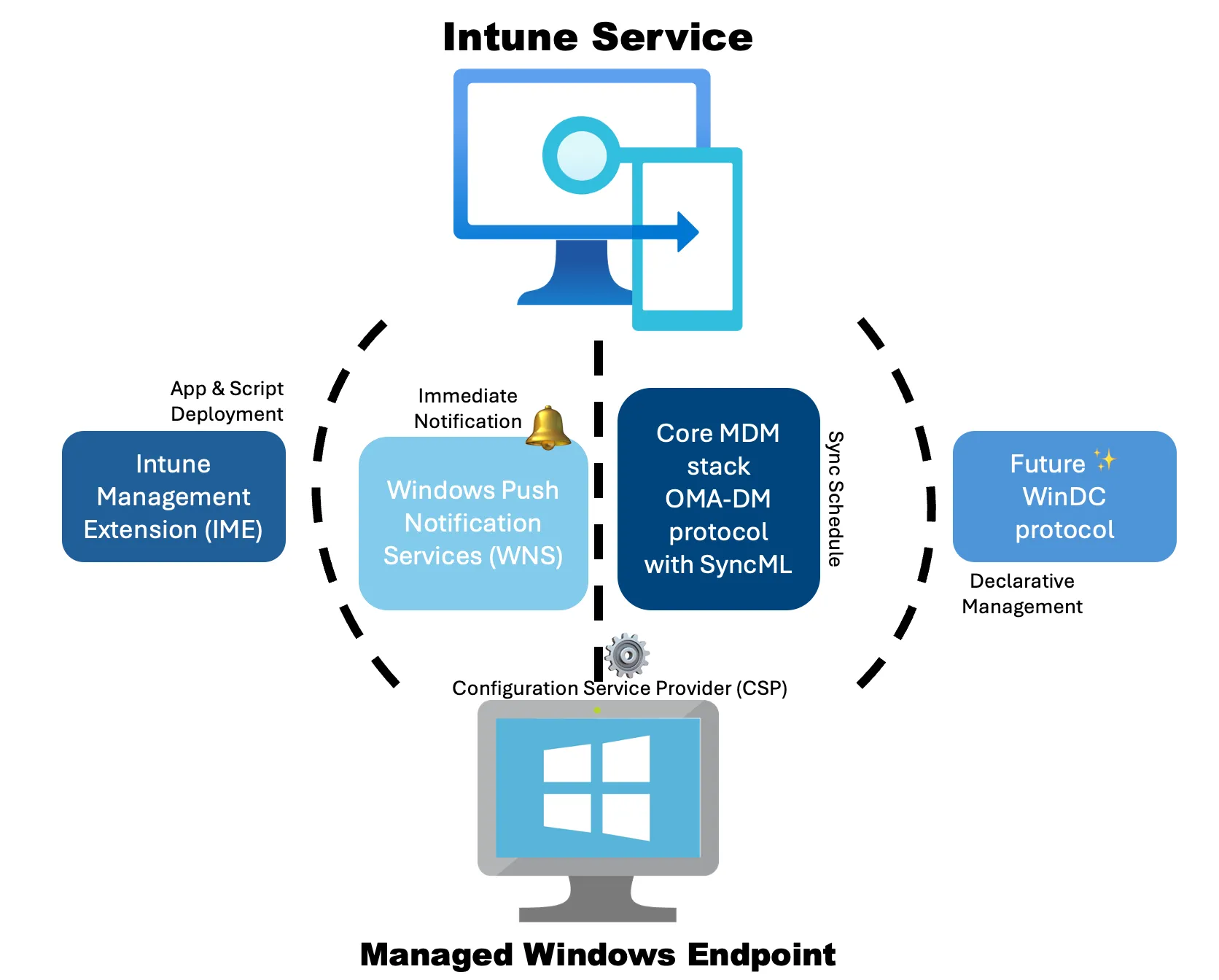
The MDM stack is the foundation of modern device management (MDM) in Intune, just like the T-Rex in Jurassic Park - powerful, dominant, and still the core of the ecosystem. It ensures that policies, configurations, and security controls are applied across managed Windows devices.
Use Case
- Policy Deployment – Ensures settings are enforced on Windows devices. Especially security & compliance configurations.
- Cloud-First Device Management – Provides a GPO-free, cloud-based approach to managing Windows endpoints.
- Remote Tasks – Handles remote actions such as wipe, retire, and remote lock to secure corporate data.
Components
- MDM Sync Mechanism – Controls how often devices check in with Intune for new configurations and policies.
- Configuration Service Providers (CSPs) – The primary way Windows devices receive and apply policies. CSPs expose configuration options, that Intune delivers. CSP reference
- OMA-DM Protocol – The engine that drives policy deployment and syncs changes (check-ins from endpoints to the Intune service).
- Windows MDM Bridge WMI Provider – A link between legacy Group Policy and modern MDM settings.
- SyncML - XML-based format used by OMA-DM to send policies and commands. SyncML messages tell the device to apply, modify, or remove settings via CSPs.
🦎 The Windows Push Notification Services (WNS) - The Velociraptor of Speed
Fast, agile, and always ready to strike - Windows Push Notification Services (WNS) acts like the Velociraptor of Intune. WNS enables third-party cloud services to send efficient and reliable notifications to users.
Use Case
- Real-Time Intune Notifications – WNS triggers immediate device check to apply new server content.
- Instant Remote Actions – Enables IT admins to execute wipe, lock, retire, or sync commands instantly.
- Efficient App & System Notifications – Third-party services use WNS to push toast, tile, badge, and raw notifications.
🦕 The Intune Management Extension (IME) – The Brachiosaurus of Customization
Sometimes slow-moving but incredibly powerful, the Intune Management Extension (IME) allows for deeper customization beyond native MDM capabilities.
Use Case
- Deploys PowerShell scripts, like platform scripts and remediation scripts for automation and advanced use cases.
- Handles Win32 app deployment, making complex application setups possible.
- Logs extensive data for troubleshooting and monitoring.
Components
- IME Agent & Service – The IntuneManagementExtension.exe process and Windows service handle PowerShell script execution, Win32 app installations, and policy enforcement.
- IME Sync & Logs – Uses background tasks to sync with Intune, fetching new scripts and apps, while storing logs in
C:\ProgramData\Microsoft\IntuneManagementExtension\Logs\for troubleshooting and Reports on the client in the Registry underHKLM\SOFTWARE\Microsoft\IntuneManagementExtension\SideCarPolicies\Scripts - Win32 App & Script Execution – Deploys Win32 apps with detection rules, dependencies, and installation tracking, and runs PowerShell scripts in the SYSTEM context for automation.
🦖🧬 Windows Declarative Configuration (WinDC) – The Indominus Rex of Intune
A genetically engineered hybrid in Jurassic World, Indominus Rex was designed to be more intelligent, adaptable, and powerful than any dinosaur before it. Windows Declarative Configuration (WinDC) with MMP-C follows the same pattern - built to replace legacy management methods with a more efficient, scalable, and autonomous approach.
Use Case
- The future of the MDM stack, taking over most of device configuration areas
Components
- Declarative Management Model – Devices apply configurations proactively rather than waiting for policies with the Declared Configuration Service (dcsvc). (Replaces traditional sync cycle schedules)
- State-Based Configuration – Ensures settings remain enforced without relying on traditional sync cycles.
- JSON-Based Policy Delivery – Simplifies configuration, making it more predictable and reliable.
Needing help? View the Troubleshooting Guide
Powered by Oceanleaf
Related posts