My dream setup - powered by Microsoft Cloud
Introduction
On this blog I regularly write about the latest Microsoft Cloud technology. With that, I scratch the surface of many great products and features, all dedicated to empower your business.
In this blog post I want to share how I am making use of a line-up of different Microsoft Cloud capabilities with a special focus on security. 🚀
What I do 🧑💻
First, I should start with a little description of my daily work. While running Oceanleaf I cover lots of different workloads, such as consulting and training of Microsoft Cloud to customers and other organizations or empowering community with diverse engagements. Additionally, I do a lot of business work and studies, including research and development. I also enjoy doing creative work.
Microsoft Cloud keeps me secure.
Anytime. Anywhere.
Components
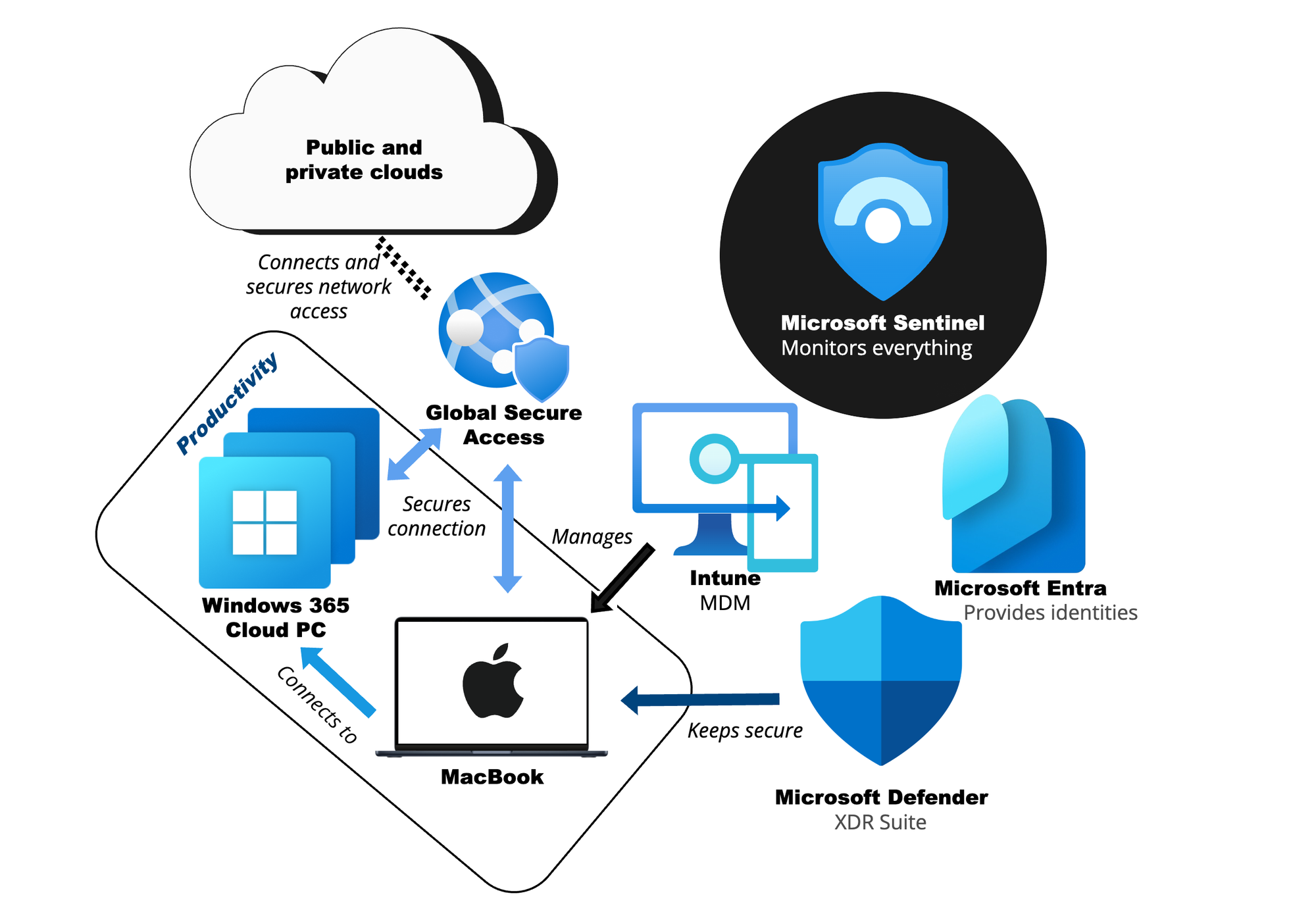
Let's jump into the different components and how they are related with Microsoft Cloud.
My MacBook, managed by Intune 💻
Earlier this year I switched my daily driver to the most recent MacBook Pro. I really like macOS and the hardware and ecosystem of Apple. For what I do, this is perfect and offers more than enough power to keep me productive.
Of course my MacBook is fully managed with Intune, including security and compliance workloads. I configure my Mac with everything I need and deploy apps directly through Intune. Plus, I have Platform SSO to keep me in sync with my Microsoft Entra identity.
 Niklas Tinner
Windows 365 - Cloud PC ☁️🖥️
To try the latest and greatest of Windows, Microsoft's operating system, I have multiple Cloud PCs running in different environments. The future of Windows looks bright and it will be in the cloud!
The switch between my Mac and the Cloud PC is seamless and I can't even tell that Windows is streamed virtually instead of running on my hardware!
During different work engagements, I use Cloud PC's to access customer environments and keep the data secure & isolated.
Niklas Tinner
Global Secure Access 🌐
Global Secure Access acts as my network broker to private and public clouds around the world. It secures traffic through access channels and tunnels and connects me with the Microsoft global backbone network.
Connection to private apps, hosted in private clouds is easy and authenticates me with my Microsoft Entra identity.
Any traffic to the Internet is regulated by a combination of GSA, Defender for Cloud Apps and Defender for Endpoint to keep me secure.
 Niklas Tinner
Defender XDR & Sentinel 🛡️
The whole Defender Suite offers extended detection and response across all of my siloed solutions, to make it one. My identity, endpoint, cloud app and Office 365 is natively monitored and protected.
My Mac is onboarded with Defender for Endpoint to deliver advanced signals to the cloud during daily work. In case of a vulnerability or threat I get a notification and detailed report on the incident.
To complete the security journey; Microsoft Sentinel is the combined bucket for all security solutions and receives data from all Microsoft Cloud products for improved correlation and data with integrity.
Niklas Tinner
🔮 Bonus: Favorite tools
For those interested, I use the following tools:
- The Microsoft Office suite for productivity
- Microsoft Planner to organize my tasks
- The Windows App to connect to Cloud PC's and more
- Notion for documentation, notes and planning
- draw.io for every sketch, diagram or edited image
- LinkedIn and X for my professional network
- Medium for research (and blogging by myself)
- Visual Studio Code for coding
- GitHub desktop and GitHub for code hosting
- UTM for virtualization of various operating systems
- DaVinci Resolve for advanced video cutting
- Signal for communication in communities
- Spotify for music
- NordVPN for occasional VPN to other locations
- Sessionize and meetup for event speaking and organization
- mmhmm for video recording
- Ghost for blogging and hosting
Demo tenants
To stay on the edge, it is key to test out new features whenever they are released by Microsoft. I highly recommend to set up demo environments and tenants. Read more
powered by Oceanleaf
Niklas Tinner