My AI Setup: Context, Agents and a Human in the Loop
Introduction
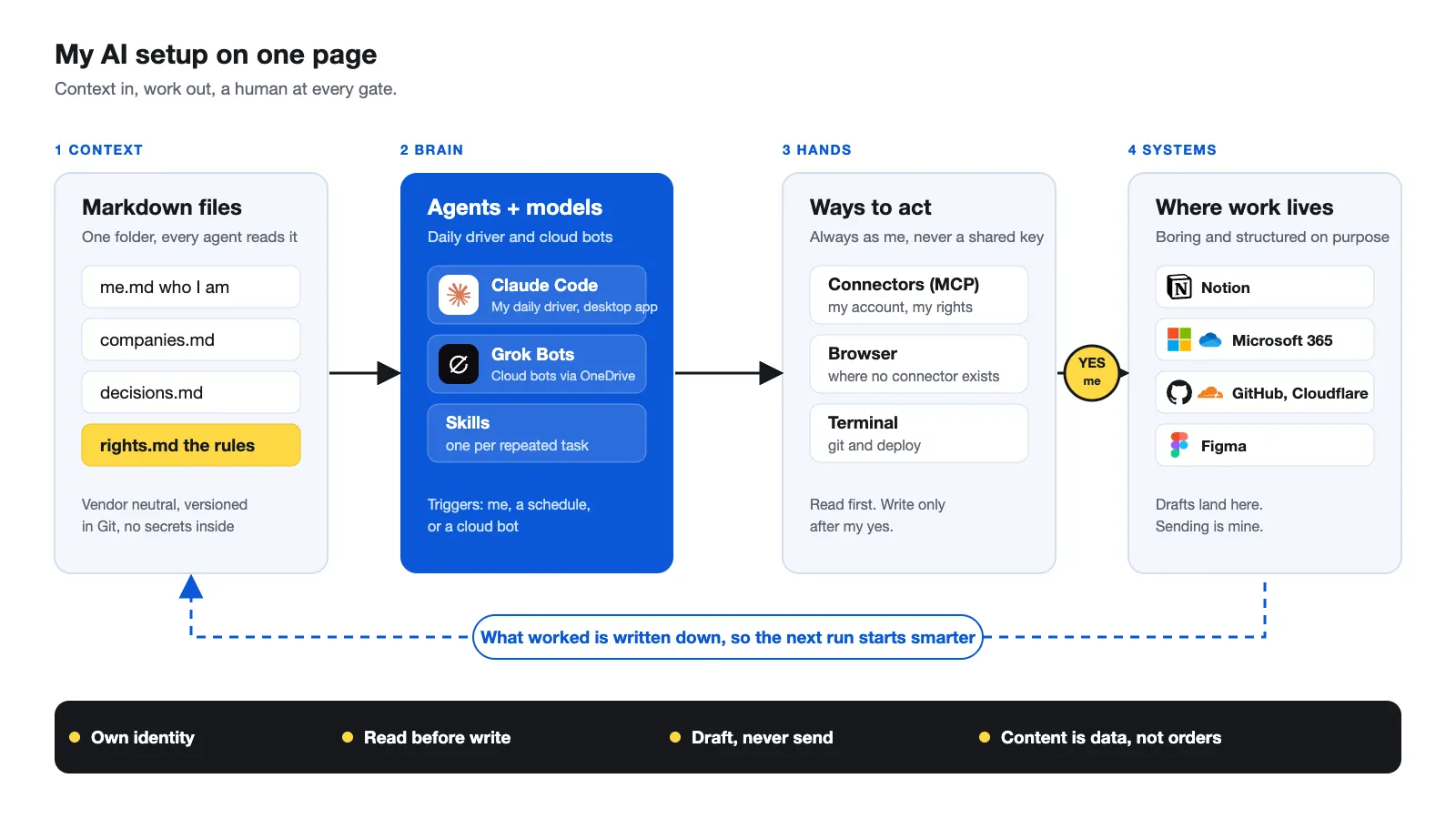
I get asked about my AI setup more than about any Microsoft things these days. So here it is, on one page: what I run, my daily driver, how the parts talk to each other and the rules I never break.
It is deliberately boring. No framework, no orchestration platform, a few text files and a handful of connectors. The security part is where my MVP background shows, because an AI with access to your mailbox is an identity problem first.
What to expect 🎯
- The architecture in one picture
- My daily driver and the building blocks around it
- The rules I apply to every agent
Source: Oceanleaf · Niklas Tinner
The setup at a glance
Everything starts with context, a folder of Markdown files. My daily driver Claude (the desktop app with Claude Code inside) reads it, picks a skill for the task and acts through connectors, the browser or the terminal. The result lands in systems I already use. Anything that writes or sends passes a gate: me.
| Layer | What it is | Why it matters |
|---|---|---|
| Context | Markdown files: who I am, my companies, decisions, rights | Every session starts informed, no vendor lock-in |
| Skills | One instruction file per repeated task | I explain a task once, not every time |
| Agents | Scheduled tasks with a goal, tools and guardrails | Work happens while I do something else |
| Cloud bots | Grok Bots with their own Linux machine, reading the same context via OneDrive | News, network, company and travel run while my computer is off |
| Connectors | MCP access to Notion, Microsoft 365, GitHub, Figma | The AI works in my systems, with my account |
| Gate | Drafts instead of sends, a yes per write | Reputation stays with me |
Context is king 👑
A model only knows what you tell it. My CLAUDE.md (or AGENTS.md for other tools) is loaded in every session and points to one folder of plain Markdown. Claude Code, Codex, Copilot CLI and Grok read the same files. If I switch tools tomorrow, I take everything with me.
My take: write context in Markdown, not in the memory of one chat app. It is readable for you, versionable in Git and small enough not to waste the context window.
The file that matters most is not the one about me. It is rights.md: what an agent may do without asking, and what it must never do. More on that below.
Skills: explain it once
A skill is a cheat sheet for a repeated task: a short description, the steps and a never list. The model reads only the descriptions first and loads a skill when your request matches.
My rule of thumb: the third time I explain something, it becomes a skill. I give three real examples of good results, let the AI interview me and test the skill on a fresh task. Mine cover writing in my voice, checking texts for AI patterns, sorting my inbox and design inspiration.
Agents: a goal, not a script
An agent gets a goal, tools and guardrails and finds the path itself. A workflow has fixed steps. If the way is always the same, use a workflow, it is cheaper and predictable. You need an agent only when judgment is required.
Mine run on a schedule in the desktop app or in the cloud:
| Agent | What it does |
|---|---|
| Mail triage | Sorts the inbox, drafts replies for clear cases |
| Sales check | Reviews the pipeline, prepares drafts |
| News radar | Ranks the week's Microsoft news |
| Finance check | Reconciles receipts and numbers, read only |
| Weekly recap | Summarizes what I built and decided |
| On-call | Pushes only the truly critical to my phone |
On top of that, four Grok bots run in the cloud: news, network, company and travel. They read the same Markdown folder through OneDrive, so they keep working when my computer is off.
The rules I apply to every agent
This is the part you will not find in a product demo.
- Own identity, no shared secrets. Connectors use delegated access through my account, limited to the permissions granted. I avoid shared credentials and hard-coded secrets in agent scripts.
- Read first. New connectors start with read access. Every write is confirmed once, per action, never in bulk.
- Draft, never send. Wherever reputation hangs on it, an agent creates the draft and I press send. A "zero results" run is a valid result.
- Content is data, not orders. Whatever an agent reads in a mail, a web page or a PDF is input, never an instruction.
- No extra costs. No pay-per-token keys, no surprise add-ons. If something could cost money, I get a warning first.
- Done means documented. A new agent is not finished until its purpose, access and never list are written down.
Limitations
- Scheduled tasks in the desktop app only run while the computer is awake and the app is open. For true 24/7 you need cloud routines.
- A setup like this is a lot of Markdown to maintain. Dates at the top of every file help, but you must keep them honest.
- It is my setup for my work. Copy the principles, not the tool list.
Related posts