Nerdio Manager for MSP: Frontier Microsoft 365 management
Introduction
Most professional MSPs use management tools to onboard, maintain, secure and standardize their Microsoft 365 customer tenant fleet.
In the frontier age, we are taking this to the next level by using agents to configure tenants. In this post I want to show you the ideal platform for this: Nerdio Manager for MSP
What to expect 🎯
- Why an MSP management tool matters even more with agents
- The top MSP use cases, then deployment and setup
- Solution baselines, policy baselines and the tenant assessment
- My favorite features
- The public roadmap
Why this matters in the Frontier age
The next admin in your customer tenants will not only be a technician. It will be an agent you talk to in natural language: «Which tenants have no break-glass account?», «Roll out the new CA policy to all retail customers, report-only first».
The first pieces exist. Microsoft's MCP Server for Enterprise lets an agent read Entra data today, in preview and read-only. Nerdio has no MCP server yet, I gave that feedback to the product team.
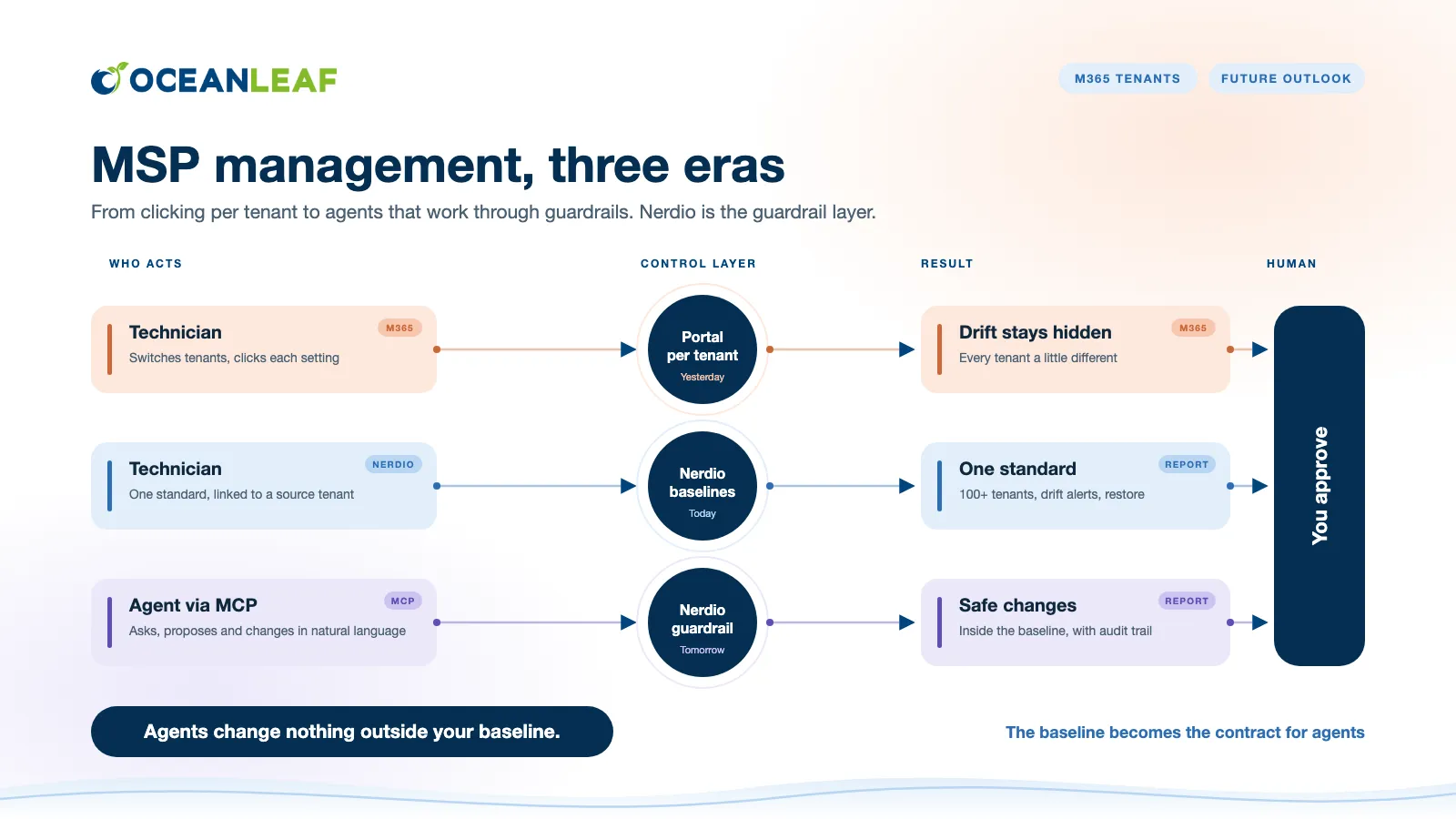
My take: the more agents act in tenants, the more important a central standard becomes. The baseline turns into the contract an agent works against: it may propose and change, but only inside what you defined, report-only first and with an audit trail. That is exactly the layer Nerdio already owns today.
What it is
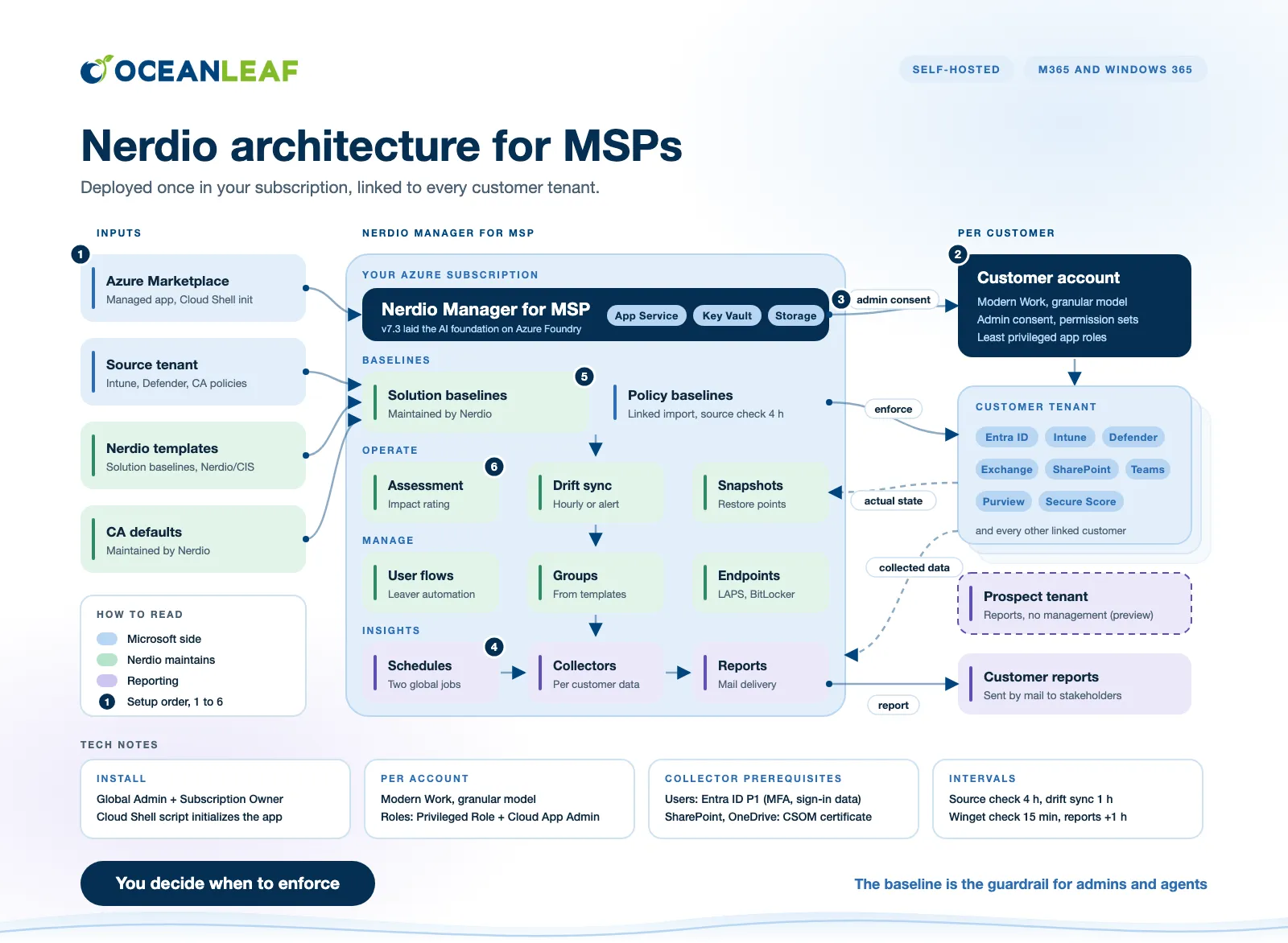
Nerdio Manager for MSP (NMM) is a multi-tenant management platform for Intune, Entra ID, Defender, Exchange Online, SharePoint, Teams and Purview, all customers in one portal without switching tenants. It is self-hosted: you deploy it from the Azure Marketplace into a subscription you own, as App Service with Key Vault and storage. This post covers Microsoft 365 and Windows 365, not Azure Virtual Desktop.
What's in the box
- Baselines: solution and policy baselines, drift handling and recovery snapshots
- Tenants and users: account onboarding, group templates, user flows and break-glass accounts
- Endpoints and apps: LAPS and BitLocker keys, Console Connect and app deployment
- Insights: reporting engine, report builder and Copilot readiness report
- Security integrations: Defender, Purview and Secure Score
- Hosting: self-hosted in your own Azure subscription
Top MSP use cases
- Brownfield onboarding. Run the tenant assessment against an existing customer. You get actual vs. desired state per setting plus an impact rating, then decide per policy: leave as-is, overwrite or split.
- One baseline, many tenants. Link a policy from a source tenant. Nerdio checks the source every four hours, flags changes and rolls the update out to all linked tenants once you approve it.
- Drift control. Automatic sync resets drifted settings every hour. In manual mode you get an alert and fix it with one click.
- Staged rollout and rollback. Start every baseline in report-only, enforce later, and restore from a recovery snapshot if a change breaks something.
- Conditional Access with a safety net. Use the built-in CA defaults. Accounts flagged as Emergency Access are excluded automatically.
- Leaver process. User flows remove licenses, revoke sessions, set out of office and convert to a shared mailbox, optionally with «Run instantly».
- Endpoint support. Read LAPS passwords and BitLocker keys in Nerdio and deploy Console Connect for remote support through Intune.
- Reporting and pre-sales. Report builder with mail delivery and a Copilot readiness report. In preview, reports also run on prospect tenants you don't manage yet.
Setup in three steps
Before step 1, deploy from the Azure Marketplace. Nerdio installs as a managed application into your own subscription, then a short Cloud Shell script initializes it. You need Global Administrator in Entra ID and Subscription Owner on the subscription. Details are in the Nerdio install guide.
1. Add the account (once per customer). Under Accounts > Add account, link the customer's Entra ID tenant, choose Modern Work, enable the granular prerequisite model and least privileged app roles mode, then the permission sets you need.
2. Enable the integrations (per customer, nothing is inherited). In the account under Settings > Integrations, grant Admin consent with a Global Administrator, then switch on the modules: Defender, Purview, Secure Score, User Management, Exchange, SharePoint, Teams and the Reporting Engine collectors.
3. Schedules and data collectors (once). Create two global schedules, datacollector and reporting one hour later, then enable the data collectors under Insights > Reporting. This is the slow part, take the time.
Solution baselines vs. policy baselines
| Solution baseline | Policy baseline | |
|---|---|---|
| What | Best practice per Microsoft 365 service | Your own set of policies |
| Maintained by | Nerdio product team | You |
| Source | Templates (Nerdio, CIS), also report-only | A source tenant or JSON |
| Reference tenant needed | ❌ | ✅ |
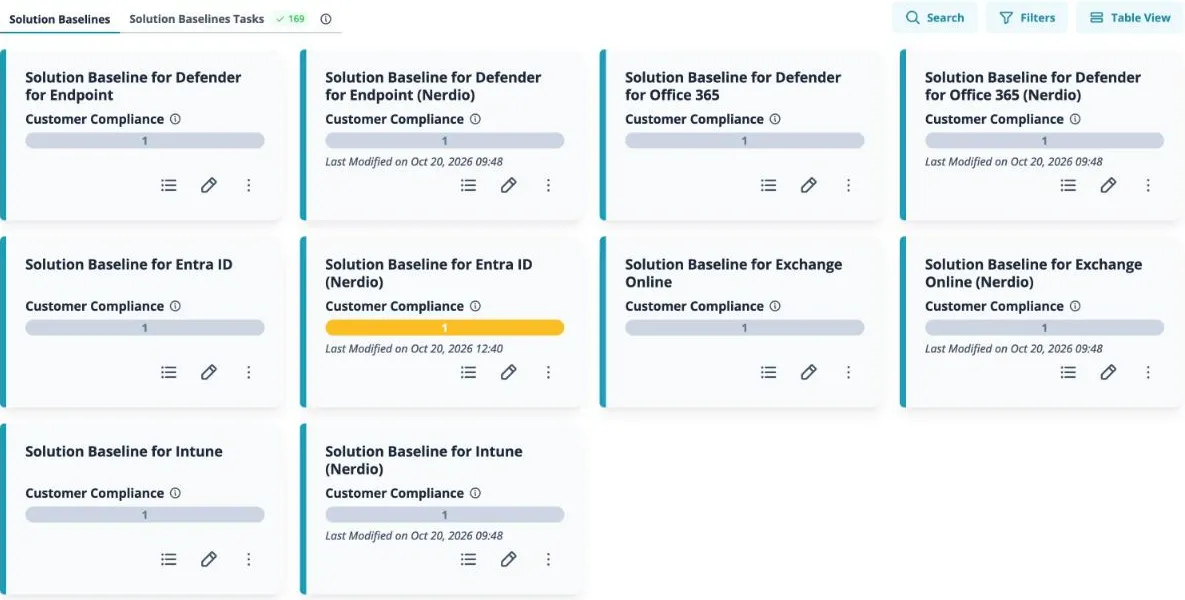
There are eight solution baselines, from Entra ID and Intune to Purview and Teams. Open each one, pick the Nerdio template and apply it. Each one can run in report-only first, then switch to enforce or exclude.
Tenant assessment: see the impact first
Before you enforce anything, run a tenant assessment with your baselines against the customer tenant. You get every setting with actual and desired state, and in the remediation wizard an impact rating with a recommended action: Leave As-Is, Overwrite and take control or Split Policy. The impact rating runs from No Conflict to Medium, so you see what a change touches before you accept it.
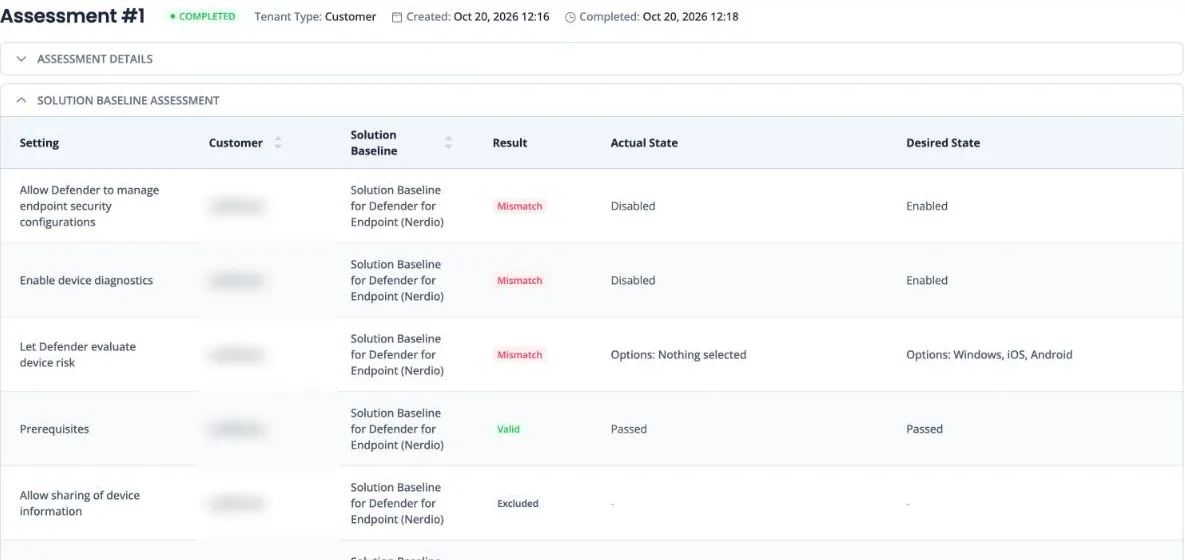
My first assessment in October 2026 with six of the eight solution baselines (130 settings): 56 valid, 58 mismatches, 12 unavailable, 4 excluded. Almost half of a demo tenant I set up myself did not match best practice 😉
My favorite features
- Linked policy import. Change a policy once, push it to every linked tenant.
- Drift handling. Automatic mode resets drift every hour, manual mode alerts you and you fix it with one click.
- Recovery snapshots. Restore your baselines after a bad rollout.
- Break-glass. The Emergency Access flag excludes an account from Conditional Access automatically.
- Instant offboarding. Remove licenses, revoke sessions, set out of office and convert to a shared mailbox.
- Group templates. Entra groups, dynamic ones included, created in every tenant.
- Endpoint helpers. LAPS passwords, BitLocker keys and Console Connect for remote support.
- App deployment. Intune apps, Winget and shell apps for all tenants.
- Reports. Report builder with mail delivery, Copilot readiness and, in preview, reports on prospect tenants.
Roadmap
Nerdio publishes its roadmap openly, with votes. In development as of 4 November 2026: travel mode for Conditional Access (most votes), user onboarding, AI-drafted policy descriptions and AI governance. Planned: a read-only REST API and a Global Reader role.
Related posts