Intune and your mobile journey
Introduction
iOS and Android are the most common platforms for mobile endpoints 📲. Of course, also those endpoints need corporate apps, security policies and need to fulfill compliance requirements and more. Management via Microsoft Intune is a common way for organizations to control and monitor their mobile devices easily from the cloud.
This post discovers foundational theoretical principles in the mobile endpoint management world and describes solution concepts and important considerations.
Motivation for mobile management
Why you should manage mobiles via Intune:
- 🛣️ Standard setup and experience of iOS and Android smartphones and tablets
- 🔐 Ensure security and protect data
- 🔖 Deploy corporate apps needed for work
- 🔭 Monitor your mobile devices on compliance, health and system status
Platforms
iOS and Android are foundational different operating systems, but they all run on mobile device factors like smartphones, tablets or within other appliances. Let's wrap up the key differences, because they also have an impact on how the management works:
| iOS 🍎 | Android 🪅 | |
|---|---|---|
| Vendor | Proprietary mobile operating system developed by Apple, offering a consistent user experience across all Apple devices | Open-source platform developed by Google, allowing for greater customization by manufacturers and developers |
| Ecosystem | More unified hardware and software ecosystem | More flexibility and diversity in the hard- and software |
| OS | Offers a more streamlined and uniform user interface, with limited customization options | Offers greater flexibility in terms of customization, allowing users to personalize their device's interface, install custom ROMs, and access system files. |
| Services | iCloud | Google Services (on most Android devices) |
| Apps | App Store is the exclusive marketplace for iOS apps (except in the European Union) | Play Store and sideloading of apks |
| Management | Requires Apple Push Notification Certificates and Management Profile | Requires Managed Google Play |
Concepts
Let's jump into some concepts that are important to understand to define your mobile journey!
MDM & MAM
First, we need to understand the difference between:
- Mobile Device Management (MDM)
- Mobile Application Management (MAM)
| MDM | MAM | |
|---|---|---|
| Management of the | Device | App only |
| Enrollment | via Company Portal or from device setup like: 🍎 iOS = Apple Automated Device Enrollment 🪅 Android = Android Enterprise | Open the app, register the device to Entra, and install broker app: 🍎 iOS = Authenticator App 🪅 Android = Company Portal |
| End user effort | User enrollment (no device reset) takes a few steps from Company Portal to register device and install management profile | Just sign into the app, register the device and restart the app |
| Configuration options | All options can be configured | Not possible -> use app configuration profiles, that are app based |
| Security options | Apply system security baselines or configurations | Apply data protection, access requirements and conditional launch |
| Compliance options | Apply Intune compliance policies | Check access requirements |
| App deployment | ✅ Supported | 🚫 Not supported |
| Retirement | Retire, wipe, delete the whole device | Wipe app data only via Intune portal |
| Conditional Access | ✅ Supported: Require compliant device (requires compliance policies) | ✅ Supported: Require App Protection Policy |
When to use what?
Reality shows, that MAM is sufficient for 90% of the use cases, as standard workers often just need access to the core Microsoft apps like Teams, Outlook and the whole office suite.
What are the reasons to manage with MDM?
- Protecting the whole device and apps that are not supported by MAM
- Device is corporate-owned any only for corporate purposes, or even a single use / Kiosk device type
- Deploy apps
- Configure more/all system aspects and security
- Defender for Endpoint onboarding is needed
- Certificate deployment, VPN or network connection configuration built-in
What are the reasons to manage with MAM?
- Users with personally-owned devices want to access corporate data securely, no enrollment wanted
- Simple & light management with less effort
Ownership
Ownership of the device is another important factor to decide which and to which extent the management of the device makes sense. A device can either be corporate or personal owned. Probably you don't want to manage these devices equally and apply more strict policies to corporate-owned devices. Also, a personal device is usually not intended to be fully managed, monitored and restricted, because it is not a corporate resource. The differences on the platforms for MDM are the following:
iOS 🍎
-
Corporate owned
- Device Enrollment: More control over the whole the device
- Automatic Device Enrollment: Supervision allows for additional over everything - control over the device and its configuration - learn more
-
Personally owned
- User enrollment (Account driven): monitor and configure basic system
Android 🪅
- Corporate owned with work profile or fully managed: full control over the device and its configuration, with optional separation between personal and work profile
- Personally owned with work profile: a separate work profile is installed and all settings, apps and data will reside in just this work container
Access control: Conditional Access
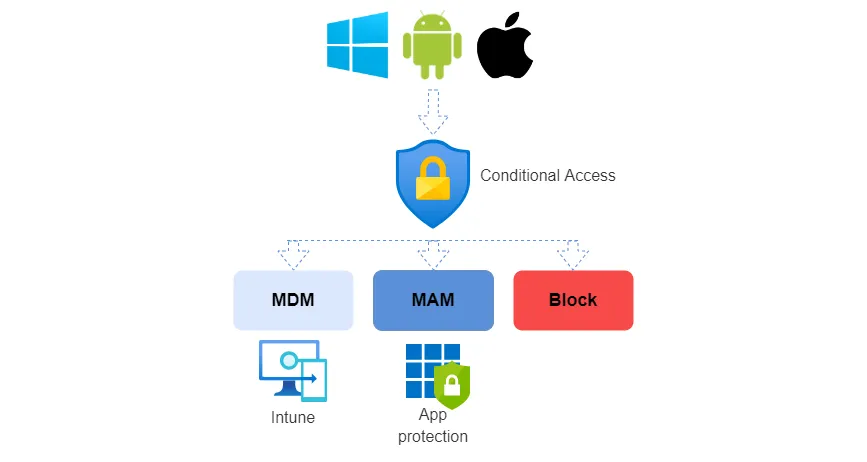
To control access for both MDM or MAM, you should implement a Conditional Access policy that validates the access requests to any Microsoft 365 service is coming from a managed device or app. Read more about Conditional Access
Access grant options
From a technical perspective there are the following grant controls which ensure an access is secured by either MAM or MDM. (some are only applicable to certain OS types) This is included in the grant option and should be set to "require one of the selected controls".
Policy design
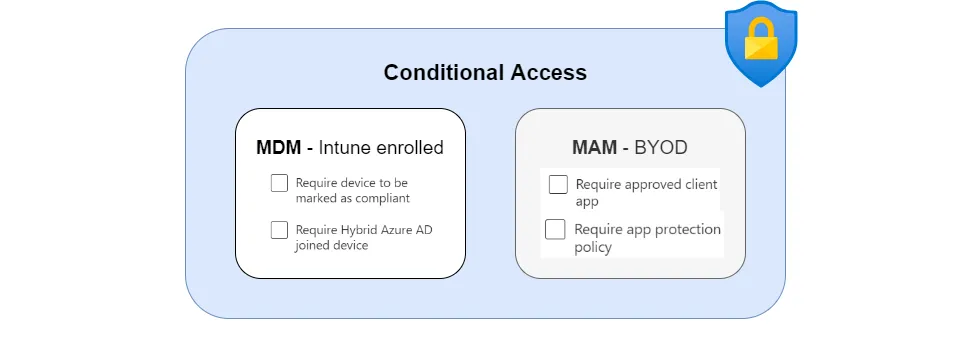
This Conditional Access Policy require MAM or MDM would look like this:
| Configuration | |
|---|---|
| Users | Include: All Exclude: Break Glass admin |
| Target resources | Office 365 + any other app that should only be accessible from a managed mobile |
| Conditions | Device platforms: Android, iOS Client apps: Mobile apps and desktop clients |
| Grant | -Require device to be marked as compliant -Require app protection policy >Require one of the selected controls |
Additional: Protecting apps accessed from the browser
You may now ask how to protect Microsoft 365 or other apps from browser access. The answer is: Conditional Access App Control (read my dedicated blog post about it) with Microsoft Defender for Cloud Apps to control the browser session on any device.
This is allows you to monitor or control app access and set granular policies through Defender for Cloud Apps such as restricting cut/copy paste, require elevated authentication (MFA), secure up- and downloads or other activities. Read the Microsoft docs
Overview
Describe the management aspects
MDM 📱
Mobile Device Management includes to configure system aspects, apps and data on the device-level. In a nutshell MDM allows to:
- Enroll the whole or user part device into Intune - corp data is isolated and separated from personal area (both platforms)
- Apply system settings, policies and profiles, including security
- Verify with compliance policies
- Deploy apps
Enrollment
Enrollment is the process to connect your device with Intune and make it manageable. The enrollment includes a authentication part, which is backed by Entra ID. Before you can enroll, you should check out the MDM authority and enrollment restrictions.
iOS 🍎
- Corporate owned: Apple Automated Device Enrollment (ADE) or Device enrollment
- Personally owned: Account driven user enrollment, authenticate with your Entra ID/Managed Apple ID federated account, start the enrollment, install the management profile (Apple)
Android 🪅
- Corporate owned: Android Enterprise Enrollment | Android
- Personally owned: Download the Company Portal from Play Store, authenticate with your Entra account, start the enrollment Android Enterprise personally owned devices with a work profile
Configuration
Configuration includes settings in policies that define system behavior, look & fees and more. In Intune we mainly use the Settings Catalog or Templates for this.
Security
Security is first of all defined by the platform security - so which security features and measures the platform, including hardware and OS provide. Check out Apple Platform Security guide and Android Enterprise Security for more information.
To ensure security with Intune, you should focus on system security settings, provided through configuration. Select a security framework and apply the recommended policies. (More about Intune security)
Compliance
Compliance policies are essential to ensure that devices which access corporate resources meet security and system requirements. Compliance policies are audit only and should be combined with Conditional Access to define the access. They check device health and system security. Actions for noncompliance can be defined, such as send a push or email notification, lock or retire the device. Read my post on Intune compliance
App deployment
Apps are the reason why we want mobile devices. With Intune we can centrally deploy, install automatically silent or make available apps from different sources.
iOS 🍎
- (Apple) Store app
- Web clip
- Web link
- Built-In app
- Line-of-business app
- Apple Volume Purchase Program (VPP) - acquire Apps directly from Apple Business Manager and deploy to devices without needing an Apple ID
Android 🪅
- Android store app
- Managed Google Play app
- Web link
- Built-In app
- Line-of-business app
- Android Enterprise system app
MAM 📥
Mobile Application Management does only control configurations, look & feel within an app. It is important to mention, that MAM is independent of the underlying device. In short it includes:
- Configure app settings
- Protect data in the app
- Define access and launch conditions of the app
App protection
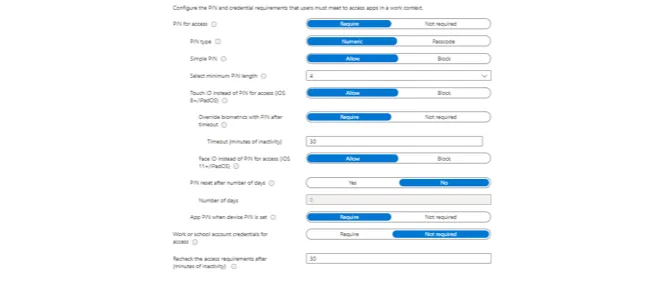
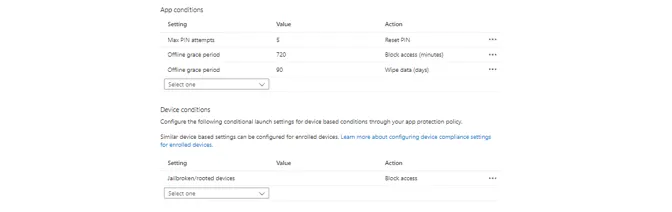
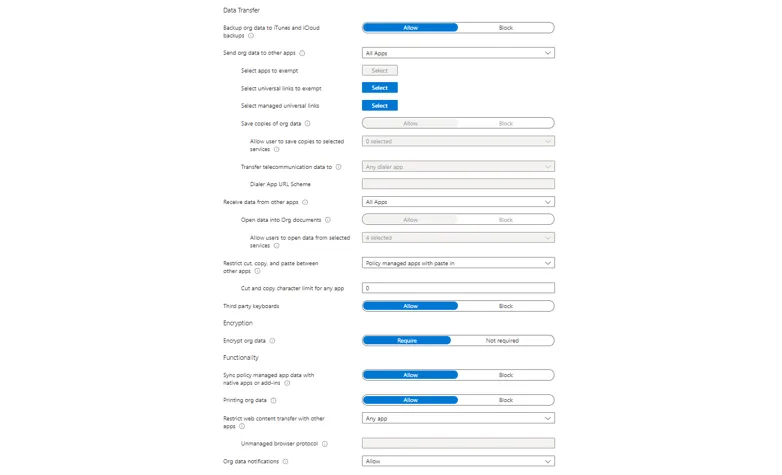
App protection policies are here to protect corporate data in managed apps and is part of Microsoft's MAM solution. These are available for iOS/iPadOS, Android and Windows 10 and later. These policies are usually applied when the device is not corporate managed and also hold personal data. The danger is that corporate data could be exfiltrated to other workloads on the device. App protection policies consists of three sections:
- Data protection - the protection, settings and functions in the corporate app or for sharing with other apps
- Access requirements - defines how to corporate app must be started
- Conditional launch - sets actions when certain requirements are not met
To adapt this service, I would recommend the Data protection framework using app protection policies from Microsoft, which is graded in three levels: Level 1 enterprise basic data protection, Level 2 enterprise enhanced data protection, Level 3 enterprise high data protection.
App configuration
App configuration policies have the capability to define settings and look in a corporate app that was deployed to an Intune managed device or has the Intune app SDK integrated or was wrapped. These can help to improve and streamline the user experience.
Getting started
If you want to start your mobile journey with Intune, I recommend you to get as much hands-on experience as possible. The technical part is not everything, don't forget about gathering requirements from your business to equip them with the right mobile setup. Ask these questions to identify which mobile device setup would be right:
General
- Is the device corporate or personal owned?
- Which OS is used?
- Which corporate apps should be accessed? are the Intune MAM supported?
MDM
- What device is desired? (low/medium/high-end) (form-factor)
- Which OS is desired/needed?
- For what is the device used? (corporate only/personal/kiosk)
- Which security baselines should be used?
MAM
- Which apps do you want to protect with MAM?
- How much should security and usability be balanced?
Prerequisites
- Licenses: Intune Plan 1
- Roles & permissions: Intune administrator
- Android: Managed Google Play Account linked to Intune
- iOS: Mandatory: Apple Push Notification system certificate (APNs) | Optional: Apple Business or School Manager | Optional: VPP token
- Verify Intune MDM authority and Intune enrollment platform restrictions
Start with Intune management
After you collected your use cases and requirements and know what's possible you can start with a proof-of-concept implementation of policies for mobiles. Please ensure you meet all the prerequisites and have your Intune tenant settings configured correctly. I would generally follow these steps:
- Define the use case
- Choose an enrollment option - get overview here
- Plan for configuration and compliance policies and app deployment
- Implement policies
- Pilot the proof-of-concept
- Feedback collection and prepare to roll out
- Roll out use case / provide to end users
powered by
Related posts